
Dressmaker Grain Line & Cutting Guide
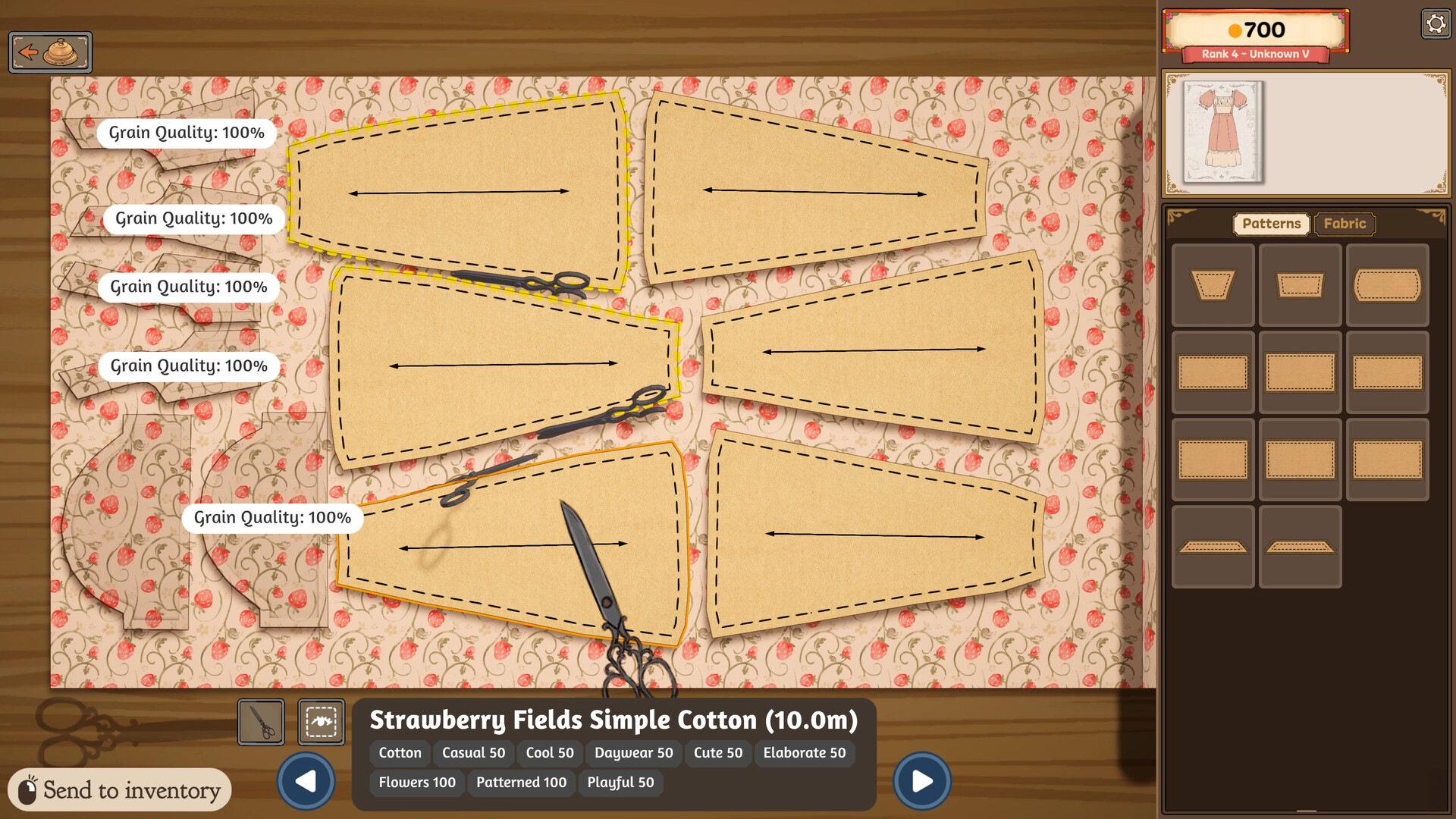
If your Dressmaker (Steam / Free Lives) quality score stays low after “perfect” sewing, check cutting first. Misaligned grain lines can cap a piece’s quality so stitching cannot fully rescue it.
TL;DR — Grain before sewing
- Place each pattern piece on fabric.
- Rotate until grain arrows point left–right (horizontal).
- Confirm the green outline before you cut.
- No green outline → do not cut — keep rotating.
- Then sew → Sewing Quality.
What grain line means in Dressmaker
In real sewing, grain is the thread direction in cloth. Dressmaker simulates that with arrows on each pattern piece. The game checks whether those arrows sit correctly on the fabric when you cut. Developers and guides consistently warn: wrong arrow direction → quality capped for that piece.
Step-by-step: align → green outline → cut
| Step | Action | check |
|---|---|---|
| 1 | Drag piece onto fabric in the cutting room | Piece fully on cloth, not hanging off |
| 2 | Rotate piece (gesture / control ) | Arrows read left ↔ right |
| 3 | Watch outline color | Green outline visible around the piece |
| 4 | Nest remaining pieces without breaking alignment | Each piece still green |
| 5 | Cut only after all critical pieces | Ready for sewing |
Quality cap rule
| Situation | Likely result |
|---|---|
| Green outline on every piece + clean sewing | Quality can reach high / 100% band |
| Sewing perfect, pieces cut without green outline | Score capped — sewing cannot fully fix it |
| Mixed: some pieces good, one bad | Weakest pieces drag the garment |
For the Steam achievement that needs 100% quality, grain discipline is mandatory → Achievements.
Cutting-room checklist
| Check | OK? |
|---|---|
| Correct pattern piece identity | [ ] → Pattern Pieces |
| Piece fully on fabric | [ ] |
| Arrows horizontal | [ ] |
| Green outline present | [ ] |
| Budget/fabric length still enough for remaining pieces | [ ] → Fabrics |
Troubleshooting
| Problem | Likely cause | Fix |
|---|---|---|
| Quality won’t hit 100% | Off-grain cuts | Re-cut with green outlines; don’t only re-sew |
| No green outline appears | Arrows vertical/diagonal | Keep rotating; confirm piece is on fabric |
| Hard to see guide on light cloth | Contrast | Slow down; follow edge carefully |
| Thought sewing was the only score | Quality triad incomplete | Also check tags/budget → Commissions |
FAQ
Which way should the arrows face?
Horizontally (left–right) in the commonly documented full/prototype guidance — confirm on your screen.
What does the green outline mean?
Visual confirmation the piece is aligned for uncapped scoring.
Can perfect sewing fix a bad cut?
Not fully — expect a cap from misaligned grain.
Should I cut without the green outline?
No.
Does grain matter for every piece?
Treat every cloth piece as grain-critical until your build clearly shows otherwise.